I was doing development on ESP32 MCU family for while now and I love this platform. I have all bunch of controllers in my lab: Arduino, Atmega, ESP, Raspberry PI and a lot more, but the ESP32 S2 and Raspberry Pi 4 is by far my favourite ones. Recently I’ve got on hold of ESP32 S3 Kaluga which is well worth writing about. Whether you are developing a customer made smart watch or a really sophisticated controller, this board is well worth of your time. First of all it is a one stop shopping for most device types you may want to consider on your project, it also has out of the box debugger to get your code to work like a clock to flash it to you final device. Schematic that comes with it also a good reference to build your own hardware. Later I will write how to make your own watch that monitors your health with more features then overpriced (but sweet) iWatch, but for now here are the instruction on how to set up your development ESP32 S2 lab for under 50 bucks. You can get the development board from multiple places, I’ve got it from Mouser . Here are a complete set of steps to run your first code and debug it on ESP32 S2. Following instructions are for Mac. Linux instructions are very similar, replace install commands with your linux package manager. I recommend to use IDF SDK from Expressive even if you haven’t used before. Arduino IDE is great but if you would like to roll like a pro, IDF is your ticket for all things ESP. It’s super simple to get started:
- Take 2 top boards out and find 6 switches marked JTAG on the main board and switch them all ON. Assemble back 2 top boards.
- Hook up 2 USB cables from the board, one to power and another one to your computer, as marked.
- Connect LED + lead to PIN IO5, – to GND
- Getting and compiling IDF and uploading sample project to ESP board:
$ cd $HOME
$ git clone https://github.com/espressif/esp-idf.git # get source code
$ sudo easy_install pip # if pip not installed
$ cd esp-idf
$ ./install.sh
$ . ./export.sh
$ cd examples/get-started/blink/
$ brew install cmake # if cmake not installed
$ idf.py set-target esp32s2 #
$ idf.py build
$ idf.py flash
You should see your LED blinking
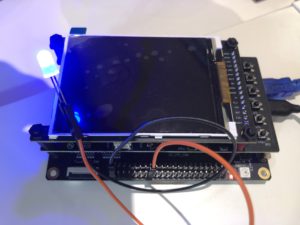
Now, to the most interesting part – debugging!
- Installing and configuring openocd , open new terminal
-
$ cd $HOME
$ git clone https://github.com/espressif/openocd-esp32.git # get source code
$ brew install openocd
$ cd openocd-esp32/tcl
$ . ../../esp-idf/export.sh
$ openocd -f board/esp32s2-kaluga-1.cfg
Open On-Chip Debugger  v0.10.0-esp32-20200709 (2020-07-09-08:54)
Licensed under GNU GPL v2
For bug reports, read
	http://openocd.org/doc/doxygen/bugs.html
Info : Listening on port 6666 for tcl connections
Info : Listening on port 4444 for telnet connections
Info : ftdi: if you experience problems at higher adapter clocks, try the command "ftdi_tdo_sample_edge falling"
Info : clock speed 20000 kHz
Info : JTAG tap: esp32s2.cpu tap/device found: 0x120034e5 (mfg: 0x272 (Tensilica), part: 0x2003, ver: 0x1)
Info : esp32s2: Debug controller 0 was reset.
Info : esp32s2: Core 0 was reset.
Info : Listening on port 3333 for gdb connections
- Attaching and working with debugger . Get back to previous terminal session.
-
-
$ vi gdbinit
target remote :3333
set remote hardware-watchpoint-limit 2
mon reset halt
flushregs
thb app_main
c
$ xtensa-esp32s2-elf-gdb -x gdbinit build/blink.elf
Here are a few gdb commands to start and stop your code, examine CPU state, disassemble the code and a lot more:
-
GNU gdb (crosstool-NG esp-2020r3) 8.1.0.20180627-git
Copyright (C) 2018 Free Software Foundation, Inc.
License GPLv3+: GNU GPL version 3 or later <http://gnu.org/licenses/gpl.html>
This is free software: you are free to change and redistribute it.
There is NO WARRANTY, to the extent permitted by law. Type "show copying"
and "show warranty" for details.
This GDB was configured as "--host=x86_64-host_apple-darwin12 --target=xtensa-esp32s2-elf".
Type "show configuration" for configuration details.
For bug reporting instructions, please see:
<http://www.gnu.org/software/gdb/bugs/>.
Find the GDB manual and other documentation resources online at:
<http://www.gnu.org/software/gdb/documentation/>.
For help, type "help".
Type "apropos word" to search for commands related to "word"...
Reading symbols from build/blink.elf...done.
0x40090dce in esp_pm_impl_waiti () at /Users/igor/esp-idf/components/esp_pm/pm_impl.c:533
533 asm("waiti 0");
JTAG tap: esp32s2.cpu tap/device found: 0x120034e5 (mfg: 0x272 (Tensilica), part: 0x2003, ver: 0x1)
esp32s2: Target halted, PC=0x40022400, debug_reason=00000001
esp32s2: Core 0 was reset.
esp32s2: Target halted, PC=0x40000400, debug_reason=00000000
Hardware assisted breakpoint 1 at 0x400852cb: file /Users/igor/esp-idf/examples/get-started/blink/main/blink.c, line 28.
esp32s2: Target halted, PC=0x400852CB, debug_reason=00000001
[New Thread 1073347244]
[New Thread 1073346492]
[Switching to Thread 1073346900]Thread 1 hit Temporary breakpoint 1, app_main () at /Users/igor/esp-idf/examples/get-started/blink/main/blink.c:28
28 gpio_reset_pin(BLINK_GPIO);
(gdb) l
23 muxed to GPIO on reset already, but some default to other
24 functions and need to be switched to GPIO. Consult the
25 Technical Reference for a list of pads and their default
26 functions.)
27 */
28 gpio_reset_pin(BLINK_GPIO);
29 /* Set the GPIO as a push/pull output */
30 gpio_set_direction(BLINK_GPIO, GPIO_MODE_OUTPUT);
31 while(1) {
32 /* Blink off (output low) */
(gdb) bt
#0 app_main () at /Users/igor/esp-idf/examples/get-started/blink/main/blink.c:28
#1 0x400914cd in main_task (args=0x0) at /Users/igor/esp-idf/components/freertos/port/port_common.c:133
#2 0x40027d8c in vPortTaskWrapper (pxCode=0x40091490 <main_task>, pvParameters=0x0)
at /Users/igor/esp-idf/components/freertos/port/xtensa/port.c:168
(gdb) l 30, 40
30 gpio_set_direction(BLINK_GPIO, GPIO_MODE_OUTPUT);
31 while(1) {
32 /* Blink off (output low) */
33 printf("Turning off the LED\n");
34 gpio_set_level(BLINK_GPIO, 0);
35 vTaskDelay(1000 / portTICK_PERIOD_MS);
36 /* Blink on (output high) */
37 printf("Turning on the LED\n");
38 gpio_set_level(BLINK_GPIO, 1);
39 vTaskDelay(1000 / portTICK_PERIOD_MS);
40 }
(gdb) i threads
Id Target Id Frame
* 1 Thread 1073346900 (Name: main, State: Running @CPU0) app_main () at /Users/igor/esp-idf/examples/get-started/blink/main/blink.c:28
2 Thread 1073347244 (Name: IDLE) vPortTaskWrapper (pxCode=0x0, pvParameters=0x0)
at /Users/igor/esp-idf/components/freertos/port/xtensa/port.c:167
3 Thread 1073346492 (Name: esp_timer) 0x4001a8d4 in ?? ()
(gdb) break 33
Breakpoint 2 at 0x400852d7: file /Users/igor/esp-idf/examples/get-started/blink/main/blink.c, line 33.
(gdb) c
Continuing.
Note: automatically using hardware breakpoints for read-only addresses.
esp32s2: Target halted, PC=0x400852D7, debug_reason=00000001

Thread 1 hit Breakpoint 2, app_main () at /Users/igor/esp-idf/examples/get-started/blink/main/blink.c:33
33 printf("Turning off the LED\n");
(gdb) c
Continuing.
esp32s2: Target halted, PC=0x400852D7, debug_reason=00000001

Thread 1 hit Breakpoint 2, app_main () at /Users/igor/esp-idf/examples/get-started/blink/main/blink.c:33
33 printf("Turning off the LED\n");
(gdb) info break
Num Type Disp Enb Address What
2 breakpoint keep y 0x400852d7 in app_main at /Users/igor/esp-idf/examples/get-started/blink/main/blink.c:33
breakpoint already hit 2 times
(gdb) help next
Step program, proceeding through subroutine calls.
Usage: next [N]
Unlike "step", if the current source line calls a subroutine,
this command does not enter the subroutine, but instead steps over
the call, in effect treating it as a single source line.
(gdb) x/10oi $pc
=> 0x400852d7 <app_main+15>: l32r a10, 0x400805fc <_stext+1500>
0x400852da <app_main+18>: call8 0x40087020 <puts>
0x400852dd <app_main+21>: movi.n a11, 0
0x400852df <app_main+23>: movi.n a10, 5
0x400852e1 <app_main+25>: call8 0x40083d8c <gpio_set_level>
0x400852e4 <app_main+28>: movi a10, 100
0x400852e7 <app_main+31>: call8 0x40026f54 <vTaskDelay>
0x400852ea <app_main+34>: l32r a10, 0x40080600 <_stext+1504>
0x400852ed <app_main+37>: call8 0x40087020 <puts>
0x400852f0 <app_main+40>: movi.n a11, 1

(gdb)
References:
https://github.com/espressif/idf-eclipse-plugin/blob/master/README.md